Performance
Debloating
Chris-Titus
In terms of debloating Windows, there is one widely recognized debloating system that is used by Windows users, who is it you may ask? Of course, it's the one and only Chris Titus and his windows utility, this legendary windows utility has allowed a majority of people to gain back their privacy from Windows, leading to an increase in speed in their computers.
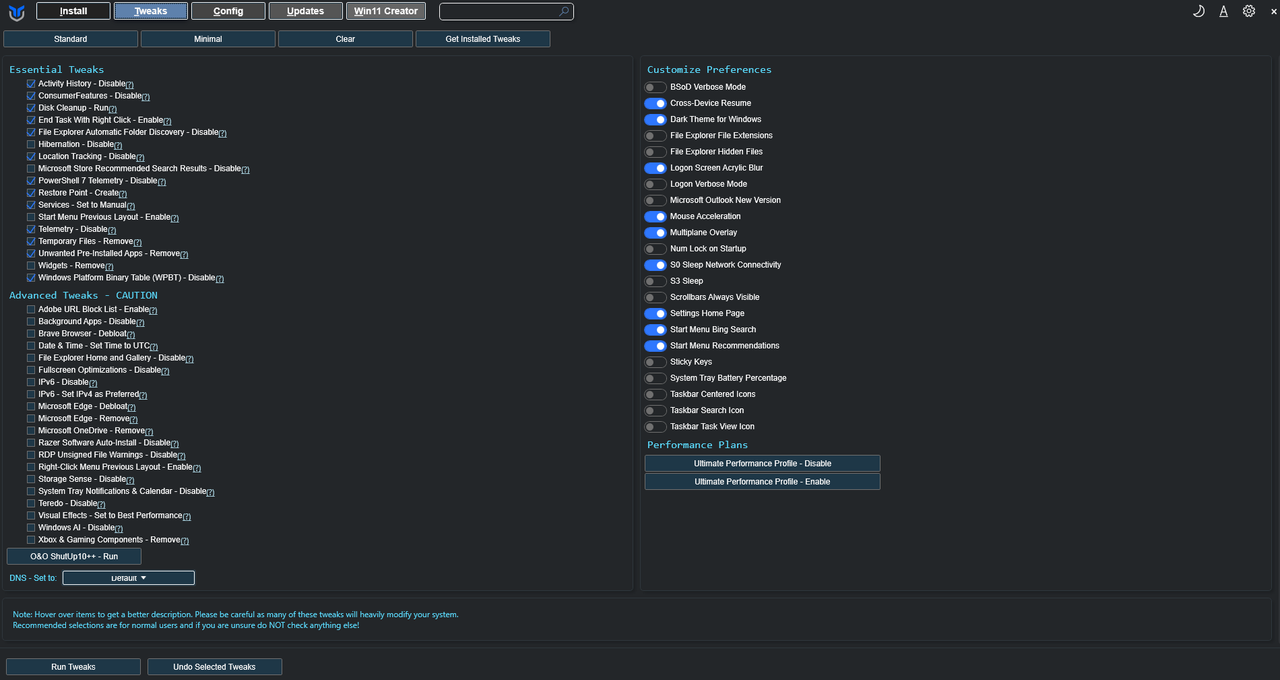 Example of Chris-Titus GUI
To run this windows utility, the person running the script should press their Windows key, then go into "Windows PowerShell" where they have to identify the section under the application that says "Run as Administrator" or more simply, right clicking on PowerShell and running as administrator. Once run as an administrator, the person who wishes to run the script can run this stable branch, recommended by Chris Titus.
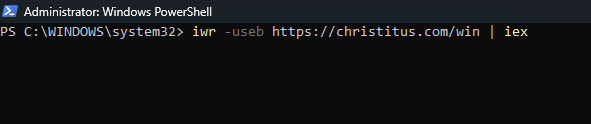 Windows Powershell script example
After running this script, the person who has run the script, depending on whether the Windows Utility GUI has been updated since this tutorial, should be able to navigate to the "Tweaks" section, in which the user would be presented with the option on the top labelled "Recommended Selections: Standard, Minimal, Clear" I, however, would not recommend that the person who is using the Windows Utility play around with the "Advanced Teaks – CAUTION" section without prior knowledge of what they are doing, however, if the person was to play around with the Advanced Tweaks section, they should only select on the options that they believe would benefit from, however, this could also be an issue to some people due to the Advanced Tweaks section containing scripts that can delete or modify applications that people use in day-to-day life, such as Windows AI being disabled, whilst someone who is unable to hear might need Windows AI in order to use live speech-to-text translation, however, it is all up to the person who is debloating their computer.
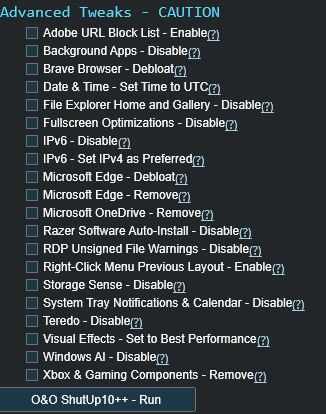 Advanced Tweaks Category
In sum, I would recommend that the person who is debloating their computer for general use, pick the Minimal or Standard option while debloating their computer, however, if you have prior knowledge on computers, (AND KNOW WHAT YOU'RE DOING), then I believe that only then should they tweak around the Advanced Tweaks section.
 Ardours says well done!
Applications
This dropdown is dedicated to apps that will free-up your memory usage, and help your computer run smoother, these will all be backed with screenshots from my computer with blank models of the applications/applications doing the same task.
 Damn, that's high RAM usage
Firstly, we will be focusing on browsers, this is because of how, obviously, browsers are the important part of a computer. With tests, I have found that the least data-consuming, whilst also fully functional, browser is Brave, surprisingly its not Firefox, with Firefox taking more memory and CPU usage than Chrome (yeesh) and with Brave being the top browser in terms of memory and aesthetics.
 Comparison between Firefox, Chrome and Brave
Music is an important point in our lives, being around since the creation of our ability to hear, although primitives would have heard it with grunts and rustling greenery, we can hear it with vibrations nowadays, and it truly is a bummer if our music takes a large chunk of our computer, in order to fix this, I have discovered foobar2000, the alternative to spotify I moved to the momenet I heard of it, compared to Foobar, Spotify takes up more than 28x the memory that Foobar uses.
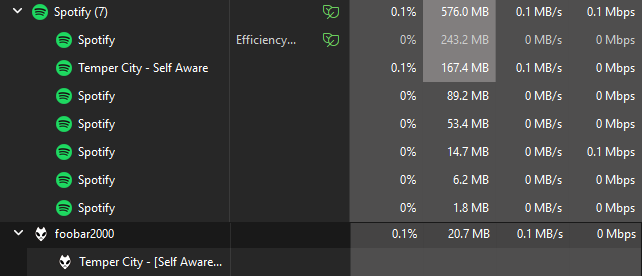 Comparison between Foobar and Spotify (damn)
There is a large controversy over which communication application is the best, and in terms of simplicity and ease of access, its Discord, however, how do I make Discord light? well my tests show that you don't. Before you come at me with "Oh but you can use Dorion for 20mb discord!" you cannot, it seems to good to be true, and it is. I also compared other "popular" discord clients, and base discord (for now) seems to be the best so far.
 Comparison between three discord types tested on calls (Webview is Dorion)
Another important aspect for computers are productive applications, such as Word, for this test, I have compared Word, a Microsoft classic with LibreOffice, Word's long lost Linux cousin, and test show that LibreOffice bats Word out of the ballpark. However, you have to consider multiple factors, firstly, with Word, it is widely used by businesses and professional environments, so you may have to use Word in order to produce documents that are a specific format that only Word has. Secondly, LibreOffice opens all of their applications at once, this is great for people who multi-task presentation slides and documents, however, this can use more memory.
 Comparison between Word and LibreOffice, note that LibreOffice takes this much because it uses all of their applications
Recording applications is something that should be installed in a majority of computers, however, it's important that you don't install just any recorder, as some screen recorders take up more memory than others, and also require subscriptions (something that I hate) in order to remove watermarks, considering this, I have compared three different screen recorders. Firstly, Bandicam, the widely known screen recorder, widely used by Roblox players and Minecraft players in the early 2010's, this screen recording software used an astonishingly high memory usage. Secondly, OBS, the most well-known screen recorder of today, used by a majority of people, which had surprisingly low memory usage. Thirdly, Fraps, a screen recording software that I personally used in the early 2010's, which had the lowest memory usage, however, has a watermark and only works in games.
 Comparison between Bandicam, OBS, and Fraps
When it comes to the basics of computers, one of the most basic functions of computers are playing mp4's, and surprisingly, the base Windows mp4 player takes up alot of memory, I have no idea why you would need every last of memory for mp4's but I won't question it. For this test, I've compared two media players, firstly, VLC Media Player, an ancient media player that has been around since the ice age, despite this it is the most trusted media player across the globe, and has really low memory usage. Secondly, the base Windows media player, Photos, which is a great app if you aren't bothered to install another media player, however, has higher memory usage.
 Primitive Golden Technology VS Modern Wooden Technology
The most crucial part of our computers are our files, why would we not want to manage our files in an environment where it doesn't have a huge impact on our computer, for this, I'm comparing two file managers. Firstly, the Windows classic, File Explorer, incredibly user-friendly, and loved by all, however, this file manager uses over 150mb of memory, as always, we can decrease this. Secondly, 7-Zip, there was always a comparison between 7-Zip and WinRAR when it came to extracting files, and I must say, 7-Zip stands at the top of the file management apps, this is because of how it uses under 2mb of memory, whilst also letting you extract just about any file, however, 7-Zip may not be as user-friendly due to its barebones design, unlike File Explorer.
 File Explorer compared to 7-Zip
Performance Enhancement
System Settings
WIP